-- INTRODUCTION --
The elves on the Audacity Forum get the same questions about entertainment recording on Windows machines over and over again. By "Entertainment," I mean music, singing, playing a musical instrument or other sound art. Anything other than talking.
Windows machines, particularly the newer laptops are aggressively hostile to the idea of recording music or other entertainment content.
Win7/Vista Laptops are designed for conferencing, corporate communications, and meeting content sharing in the field or locations away from the business office. Not recording a guitar solo. They're not tape recorders.
-- CONNECTIONS --
Large deskside or office Windows machines typically come with three connections such as the three colored sockets here.
From top to bottom:
- Green is generally Stereo Line Out. You can connect this socket to small stereo speakers, earbuds, stereo headphones, or a lead to the "AUX IN" on your large house stereo entertainment sound system. High level stereo sound comes out of this socket to do with as you please.
- Blue is the next one down and it's usually Stereo Line-In. This is the connection that will accept a stereo show from a high-level stereo sound device for recording. You can connect and record sound equipment such as a Stereo Mixer, Cassette Machine, the analog connections of a USB Turntable, or the headphone output of an MP3 Player or even a CD or DVD player -- portable or not. All these devices supply high level stereo signals and can be connected with cables similar to this.
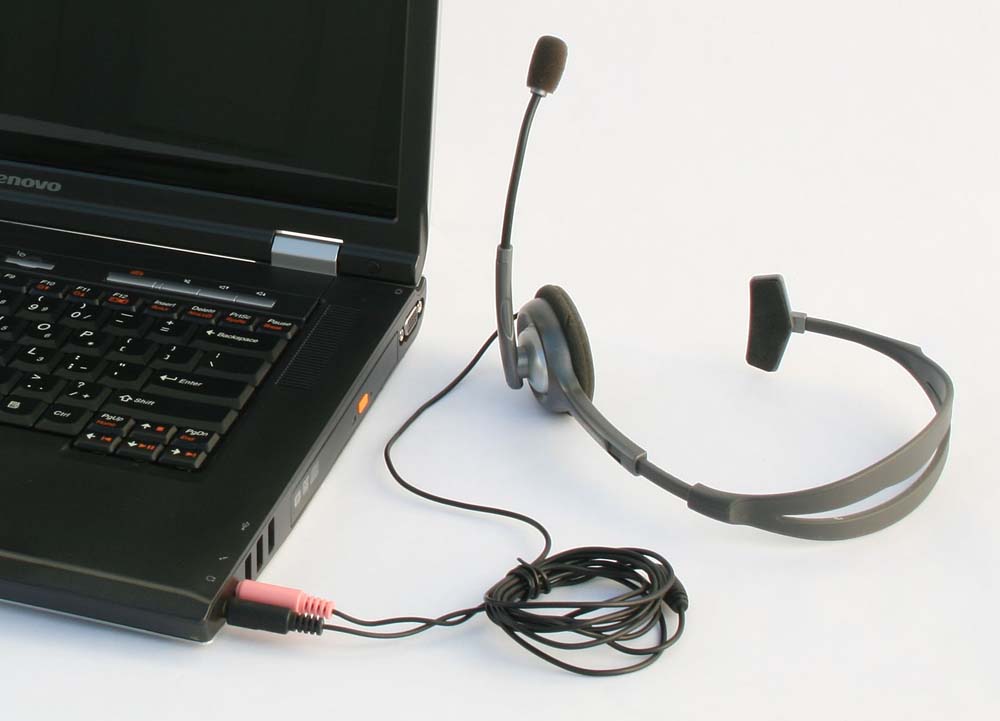
- Pink is the last one down and is usually Mic-In. It's mono, not stereo, and is designed to be sensitive to the very low level, delicate signals coming from a microphone such as a headset like this.
If you plug something intended for the Blue connector into the Pink connector, you can be missing the right channel of the stereo show and the left channel has a good chance of being too loud, horribly distorted, crackly, popping or crunchy. There is no recovery. Because of the way microphone connections work, you usually can't adjust your way out of problems -- and you may never get the right channel of music recorded at all.
It's very common for Windows Laptop Computers to be missing the Blue socket.
Some laptops have a Blue socket and some laptops have the ability to switch the Pink one between stereo and mono, but those are not common. Consult your computer instructions.
You can artificially create a "Blue Socket" or high level stereo input with an external USB sound device such as the Behringer UCA-202.
-- Windows Conferencing --
Let's say you do manage to get your stereo show into the computer. Win7/Vista commonly default to special sound processing so to better make audio or video conferences work.
There are generally three services which make your voice sound terrific when you're speaking between time zones to the business home office and which completely destroy entertainment recording.
-Echo Cancellation. The computer will "listen" to the performance and try to determine which are the sounds likely to interfere with your speaking voice, such as air conditioning noise, traffic, or other room noises -- or music and try to cancel them out of the conference.
The classic symptoms of this happening are a perfect music recording for a certain number of seconds and then your music fades and gets honky, gargling, bubbling or talking into a barrel.- Auto Level Setting. The computer tries to determine your normal speaking volume and adjust it so it fits gracefully into the conference along with all the other voices in the meeting. Nothing like having a multi-part corporate conference call where one voice is explosively louder than all the others. Not good, so the computer adjusts level automatically. This gives you a music recording that sucks all the expressiveness out of the performance. No matter how loud or soft you get, the show stays the same volume.
- Environment Cancellation. Some systems try to determine the overall volume of the room noise with you not speaking. Every time you stop speaking, the computer senses that you did and turns off the sound channel. This gives you a velvety voice conference, but deletes quiet musical passages.
You can go into Windows Control Panels and turn these services off.
-- Recording the Internet --
People are generally horrified when they find out how hard it is to force Win7 and Vista machines to record sound from the internet. Windows intentionally hides those services (and sometimes leaves them out) because they can make voice conferencing unstable or unusable. People usually persist ("Why do you think I bought the computer?") and rejoice in collecting the sounds of a cat flushing the toilet.
This, too, can mess up personal entertainment recording (the service, not the cat).
We provide instructions to force your computer to record internet audio. There are no instructions to recover, so write down what you did, because you have to undo it to get back to recording your guitar.
In General, you record from a Windows service such as Stereo-Mix, Mix-Out, or What-U-Hear to get internet sound. That's the last thing you want when you're recording your guitar because that may give you echoes, repeats, double notes or other feedback effects. Record directly from Stereo Line-In, Mic-In (if you have a headset microphone) or the USB adapter if you decided to buy the hardware.
-- PC Sound Card --
It's pretty common to think you're going to create a terrific quality show from your performance by recording it through your sound card.
Probably not. Sound Cards and sound services are throw-away computer product features only put there because everybody is expecting them. Few people try to record any performance, ever, and only use the computer to watch YouTube (see: Cat Flushing). A high quality sound card is a complete waste of money.
Sound Cards start out life cheap and inexpensive and have to live inside the insanely noisy and inhospitable computer case. I have one PC sound card that is noisy on one channel and that's just the way it is. There are no guarantees with these things and many computer advertisements don't even mention them.I noted the Behringer UCA-202 above and that's a good way to get your sound card away from the the noisy computer. Behringer makes a number of different sound cards -- some have Phono Preamps built in like the UFO202 for those trying to capture their lost youth in the form of vinyl records. Not that that's ever happened to me.
Enjoy.