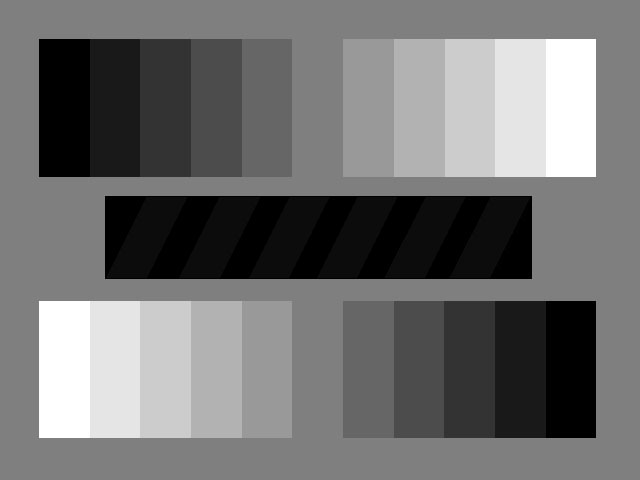
 640/480 (18.7K Picture)
640/480 (18.7K Picture)
Gray Chip Chart
This chart is only available in approx. 640/480. Size isn't that important. It either works or it doesn't. (Revision 1.1 12/29/95)
The Gray Chart has one very obvious test and two not-so-obvious ones.
This chart has 11 digitally-generated neutral gray patches and a neutral background. If the chart doesn't look gray on your monitor, there's something wrong. Off color whites or blacks or an overall color cast, if not extreme, can be corrected by adjustments inside the monitor or in some cases, a software adjustment. Individual patches exhibing a color cast not shared by their neighbors could mean a damaged video board and probably not a monitor problem. If your monitor is older than you are, you may have a picture tube that's so tired that it displays three color errors; bluish whites, greenish grays, and a redish black, for example. There is no known cure for this. You need a new monitor.
Hidden test number one: look at the dark bar in the center of the chart. This bar has broad zebra stripes of 5 percent gray over dead black. Adjust the brightness (the "sunshine" control) on your monitor down until the entire bar is black, then up until you can just see the stripes. Display that bar as large as you can. Big is good. If you never see the stripes, then the monitor is adjusted wrong inside or the system "gamma" may set wrong on your Mac.
Hidden test number two: do you think your monitor is adjusted for 6500 degrees Kelvin [daylight] as it probably should be? Display the gray chart as close to your full monitor size as you can with a black or white boarder to make up the difference. Turn off the lights and open the blinds to all the windows in the computer room on a bright sunny day between 10 A.M. and 2 P.M. (You Pacific North-Westers may be out of luck on this one) Assuming no billboards or brightly painted walls, the outside sunlight color is now very close to 6500. Back away from the monitor until it's just a very small part of your vision so the screen doesn't "take over" your eyes. Compared to the room and the outside sunlight, a 6500 monitor will look very close to neutral, a 9300 or worse monitor will look very blue. A 3200 [tungsten] monitor will look very orange. Tungsten balanced monitors usually aren't much of a mystery since they look weird to most people. TV sets are generally shipped very blue so many people see that as "normal".